
guide
Resource Maps
Wiki edited Oct 14, 2026
Summary
- Players have a harvesting skill gain check on each harvest attempt while using a Resource Map (Ore Map, Lumber Map, Fishing Map, Skinning Map)
- Players must meet the minimum effective skill requirement on the material to complete the map for Mining, Lumberjacking, Fishing, and Forensic Evaluation
- Resource Maps are not affected by the 60 second harvesting lockout resulting from Recalling/Gating/Hiking/Moongate travel
- Players can now find Plant Seeds when harvesting from Resource Maps, with resulting rarity levels significantly higher than Plant Seeds discovered while doing "basic" harvesting
Decoding a Resource Map
- Resource Maps are managed through a Resource Map Menu that will display when a Resource Map is double-clicked in the player's backpack
- Players must seperate a Resource Map from its stack in order to double-click it
- To begin a Resource Map, players must Decode it
- Players can Decode a Resource Map by clicking the "Decode Map" button in the Resource Map Menu
- Decoding a Resource Map will require the player to be stationary for 15 seconds and the player must be able to consume 1 Explorer Pack from their backpack upon completion
- If the player moves prior to completion, the action will be cancelled
- Once a player Decodes a Resource Map, it becomes their "Active Map Item" (across their OutlandsID (all characters and accounts)
- An Active Map Item adopts a Red Hue, becomes Blessed, and is now Bound to the character who decoded it
Hike to Vicinity
- Players must travel via Hiking to a location near the Resource Map's Camp location by clicking the "Hike to Vicinity" button
- Players will no longer be able to see a visual preview (Map Popup) of the Resource Map's location
- All normal restrictions for Hiking via Atlas Books will apply when using Hike to Vicinity to travel
Navigate to Camp
- Clicking the "Navigate to Camp" button will display a Tracking Arrow that points to the location of the map's Resource Camp
- Unlike normal Tracking Arrows, this will not display the target coordinates nor display the distance to the destination
Reveal the Camp
- Players can attempt to Reveal the Resource Camp for their map by clicking the "Reveal Camp" button in the Resource Map Menu
- Attempting to reveal a Resource Camp will require the player to be stationary for 15 seconds and the player must be able to consume 1 Explorer Pack from their backpack upon completion
- If the player moves prior to completion, the action will be cancelled
- Players must be within 3 tiles of the Resource Camps' location in order for the Reveal Camp action to be successful
Completing a Resource Map
- Use the tool and target yourself to begin harvesting
- Harvest away!
- Once a player has harvested all resources (or made all Casts Remaining on a Fishing Map) from a Resource Map, it will automatically complete the Resource Map, which will become deleted, and its Resource Camp will vanish
- A player's Active Map Item (Treasure or Resource Map) must be Abandoned/Expire or be Completed before they can perform actions on a different Map Item
- Players can elect to Abandon their active Resource Map by clicking the "Abandon" button in the Resource Map Menu (requires triple-click confirmation)
- Abandoning will delete the Resource Map and its Resource Camp (if revealed)

Special Loot
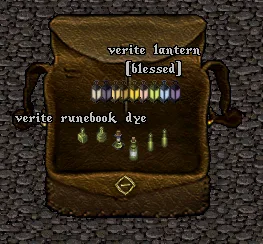
- Players have a chance to loot rare resource-hued items from Resource Maps, such as Verite Lanterns, Valorite Runebook Dyes, Avarite Carpet Dyes, Gold Hair Dyes, etc
- The hue of the rare item will correspond to the specific resource of the map used; players harvesting from Verite Ore Maps/Verewood Lumber Maps/Verehide Skinning maps will potentially get green items (labeled as Verite) whereas players harvesting from Copper/Copperwood/Copperhide maps will get tan-colored maps (labeled as Copper)
- Fishing Maps mirror Ore/Lumber/Skinning Maps in terms of having an assigned material type (such as Dull, Shadow, Copper, Bronze, etc), which is named similarly to those maps except with the word "scale" attached instead of "wood/hide/etc" (such as Dullscale Fishing Map, Shadowscale Fishing Map, Copperscale Fishing Map, etc)
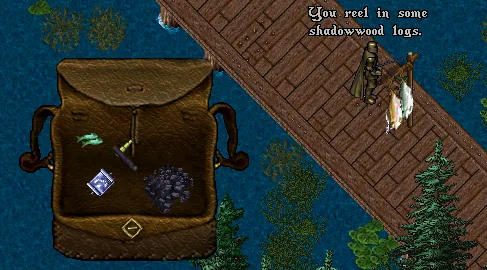
Fishing Maps
- Fishing Maps function similarly to Lumber/Ore/Skinning Maps where they complete when their Total Resources remaining reaches 0
- Players will receive Resources (randomized between Boards, Ore, or Leather) on every Fishing Map harvest action and players cannot "fail" to make a harvest attempt
- Aquarium Fish will occur as an additional loot item, rather than taking the place of receiving resources
- Players will not receive Basic or Special Fish from Fishing Map harvest actions
- Rare Loot Drops that occur for a Fishing Map (such as Backpack Dyes, Hair Dyes, etc) will now match their hue to the material of the Fishing Map being used (i.e. a player might find a Shadow Backpack Dye from a Shadowscale Fishing Map)
- Harvesting animation speed is increased for Fishing Maps and harvest completion has a reduced wait time of 2 seconds
Map Quantities
Map Resource Total Amounts are as follows:
- Dullcopper / Dullwood / Dull Hide / Dullscale: 180 Resources
- Shadow Iron / Shadowwood / Shadowhide / Shadowscale: 165 Resources
- Copperwood / Copper / Copperhide / Copperscale: 150 Resources
- Bronze / Bronzewood / Brozehide / Bronzescale : 135 Resources
- Gold / Goldenwood / Goldenhide / Goldenscale: 120 Resources
- Agapite / Rosewood / Rosehide / Rosescale: 105 Resources
- Verite / Verewood / Verehide / Verescale: 90 Resources
- Valorite / Valewood / Valehide / Valescale: 75 Resources
- Avarite / Avarwood / Avarhide / Avarscale: 60 Resources
Timer and Restrictions
- Players can only have 1 Active Map Item at a time, which includes any Treasure Maps or Resource Maps (Fishing / Lumber / Ore / Skinning)
- Players cannot use Resource Maps that are Bound to a character not on their OutlandsID
- Players must either complete their Active Map Item, or Abandon it before they can decode or perform actions on other Map Items
- Single-clicking an Active Resource Map will display how much time remains until it expires and who it is currently Bound to
- Once a Resource Map becomes Active, it will automatically expire and become Abandoned if not completed within 30 minutes
- When a Resource Map is Abandoned/Expired, it will be deleted along with the Resource Camp (if created)
- Players cannot use the Client/Razor to send scripted Menu/Gump responses to the Treasure Map Menu (this is to prevent potential automation)
- Players can only place undecoded Treasure Maps for sale onto Player Vendors
Mentioned in official posts
- patchPATCH: So Many QoL Updates & More!Mar 23, 2026
- patchPATCH: April 4 – Aspect Changes, Chromatic Items & more!Apr 4, 2024
- patchPATCH: New Aspects, Updates and So Much MoreMay 22, 2023
- patchPATCH: Nov. 1 – Mastery Chain Shared XP Update, New Harvest Antiquities, Knight’s Tabard and more!Nov 2, 2021
- patchPATCH: August 21 – Fishing & Harvesting OverhaulAug 22, 2020
- patchPATCH: July 21 – New Seamap Tables, Bug Fixes and moreJul 21, 2020