Summary
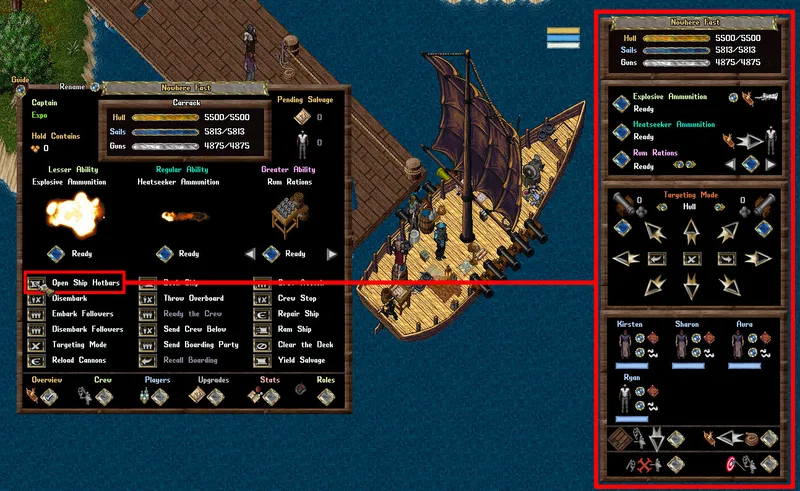
- Players can activate a series of individual Hotbars that can be used to manage and monitor the ship and its Crewmembers easily
- Players can drag and move each individual Hotbar, as well as close any Hotbars they do not wish to have up
- Each Hotbar is refreshed and updated every 3 seconds
- Check Ship Commands for a list of available commands
Captain Only Mechanics
The following mechanics of a Ship can now only be performed by the Captain of the ship:
- Moving/Steering
- Fire Cannons
- Activate Ship Abilities
- Manage Crew (Ready/Send Below)
- Nominate Crew Attack Targets/Stop Crew Attack
- Send/Recall Boarding Parties
- Docking/Shipping Crates
Stats Hotbar
|
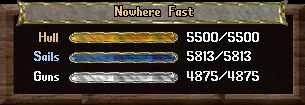
- Displays the name of the ship
- Displays the Hit Points of the Ship's Hull, Sails, and Guns
- Players can double-click other ships to open their Stats Hotbar
|
Actions and Abilities Hotbar
|
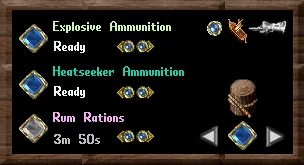
- Displays all the ship Abilities currently installed
- Players can click the small arrows to rotate through each ability type and can click the large blue buttons next to each to activate the Ability if it is currently ready
- Ships can have 2 Lesser, 2 Regular, 2 Greater abilities installed, and 2 auxiliary
- Players can click the Ship Pointer button in the upper right corner of the window to bring up a cursor, target a ship and bring up that ship's main gump window
- The bottom right arrows are used to rotate through nearly all possible commands on the ship
- The icon will change per command, such as "Make a player Co-Owner of the ship", "Reload the Cannons", "Embark/Disembark", etc
- Clicking the large blue button in the between the arrows will attempt to perform the action if possible
|
Navigation Hotbar
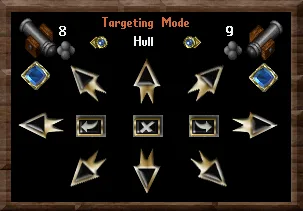
|
- Players use the Navigation Hotbar to quickly and easily steer the ship, change Targeting Mode for cannons, and fire cannons.
- The number of ammunition available on each side of the ship is displayed next to each cannon
- Players can click on either large blue button to fire the ship's cannons (the ship will automatically determine which side of the ship to fire from based on the target location)
- Clicking the small arrows will go through the various cannon Targeting Modes, and the next time the cannons are fired, the ship's Targeting Mode will be set to that mode
- The Targeting Modes are:
- Hull
- Sails
- Guns
- Crew
- Accuracy
|
Firing Cannons
- Cannon accuracy increases for the firing ship every 1% per second when it is stationary, up to 10%
- Stationary accuracy bonus applies in PvP and PvM, And it does not matter if the target is moving.
Crewmember Hotbar
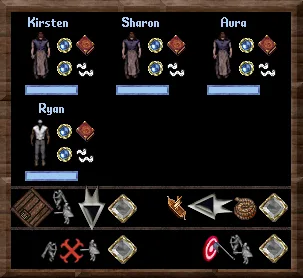
|
- Hired Crewmembers will be displayed here
- Players can heal Crewmembers with Magery or Healing by clicking the button next to either the Spellbook or Bandages
- Crewmember Name and HP Bar Color Coding is as follows:
- White - Crewmember is currently "Below Deck" (i.e not readied)
- Blue - Crewmember is "On Deck"
- Orange - Crewmember is currently "Boarding" an enemy ship
- Grey - Crewmember reached 0 Hit Points and became Incapacitated, they are considered "Recovering"
- Toggle to either Send Crewmembers Below or On Deck
- Attempt to Board the targeted ship
- Order Crewmembers to Stand Down
- Order Crewmembers to Attack or target own ship to fight boarders
|
Ship People Things